Sitecore
My Contribution to Sitecore - 2026
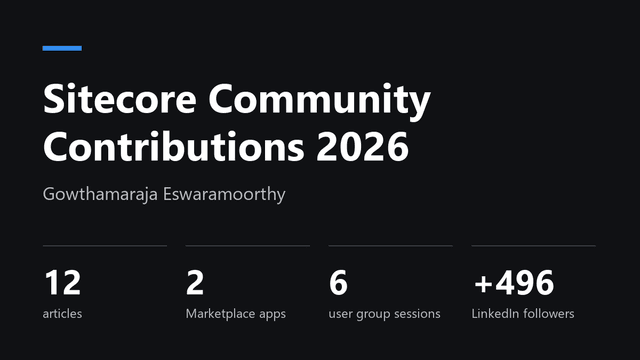
12 technical articles, 2 Marketplace apps, 6 user group sessions, a product bug fixed and 496 new LinkedIn followers.
Sitecore
12 technical articles, 2 Marketplace apps, 6 user group sessions, a product bug fixed and 496 new LinkedIn followers.
SitecoreAI
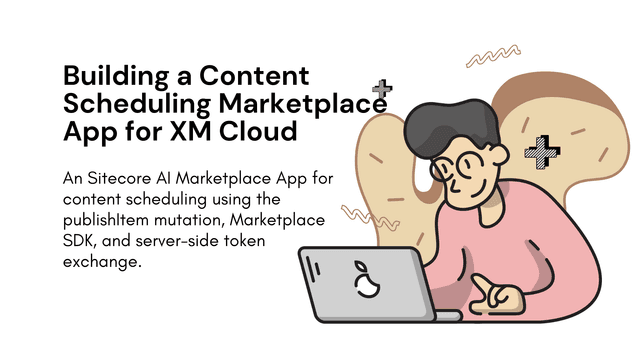
I kept getting pinged by marketers asking me to manually publish pages at specific times. XM Cloud has __Publish Date and __Unpublish Date fields on every item, but writing to them alone doesn't do anything you still need to trigger a publish job separately. And marketers can't do either without
Sitecore Marketplace
We've built our Marketplace app, integrated it with XM Cloud APIs, and tested it locally. Now comes the most critical part—deploying to production and making sure it performs flawlessly for your users. This final part covers everything from deployment strategies to performance optimization, security best practices, and preparing for the
Sitecore Marketplace
In Part 1, we built our first Marketplace app and got it running in XM Cloud. Now it's time to take things to the next level—building production-ready apps that actually solve real problems. We'll explore all four extension types, integrate with XM Cloud APIs, and write code that you can
Sitecore Marketplace
Welcome to Sitecore Marketplace—the game-changer that lets you build custom apps just like adding plugins to WordPress, but way more powerful. In this three-part series, I'll walk you through building Sitecore Marketplace apps from scratch. By the end of Part 1, you'll have your first working app running inside XM

Sitecore
Sitecore has just released Content SDK v1.3.1, marking a significant milestone for the XM Cloud development community. This release brings the highly anticipated General Availability of App Router support, transforming what was previously a beta feature into production-ready software that enterprise teams can confidently deploy. What makes this Release Important?
SitecoreAI
While working hands-on with the official Sitecore PLAY! Summit demo – one of the most complex, production-grade JSS applications in the ecosystem (50+ components, multisite middleware, OrderCloud, Sitecore Search, Content Hub DAM, Auth0, and more) – I attempted a full migration to Sitecore Content SDK 1.2.1. The results from the
SitecoreAI
If you’ve been working with Sitecore XM Cloud (now evolving into the broader SitecoreAI platform as of November 2025) and wondering how to take your marketing automation to the next level, the strategic partnership with Gradial — announced on July 14, 2025 — is a game-changer you don’t want to

SitecoreAI
SitecoreAI and Sitecore Studio redefine digital experience creation with AI-driven workflows, composable SaaS, and developer flexibility.

Sitecore
Let’s be honest—publishing in Sitecore XM Cloud has sometimes felt like sending your content into the void and hoping for the best. You hit publish, cross your fingers, and wait. And wait. And maybe check a log file or two if you're lucky enough to have access. But that’s all
Sitecore Search
Sitecore Search is a powerful tool for managing content, and I recently explored its functionality, specifically in the context of the Push Source. During my exploration, I encountered a challenge: deleting specific types of documents in bulk. Surprisingly, Sitecore Search does not provide a direct method for achieving this scenario.

Sitecore
A Thrilling First Encounter in SUGCON Attending SUGCON India for the first time was an exhilarating experience. It was incredibly rewarding to meet key figures from the Sitecore community in person and engage in meaningful networking. The community is buzzing with energy and openness, making it a perfect environment for
Sitecore Docker
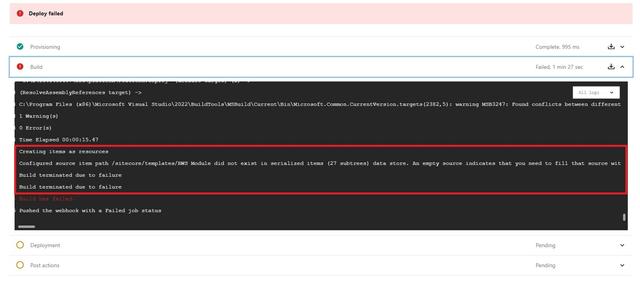
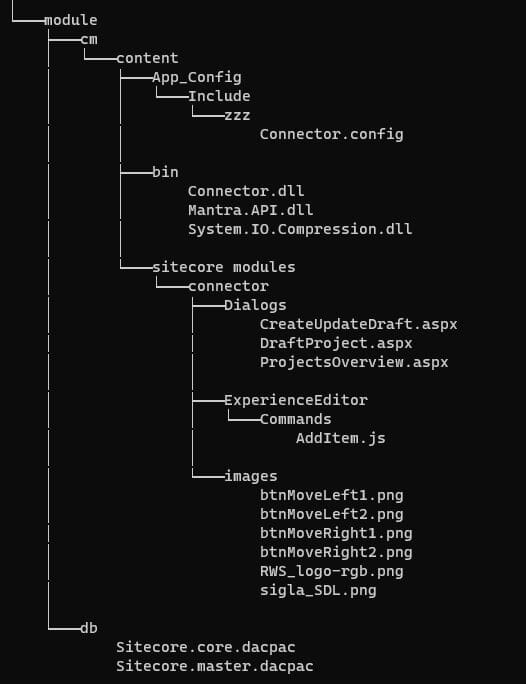
I worked on making a special module for Sitecore XM Cloud, combining items from both Core and Master, along with some DLLs and aspx files. While developing locally using XM Cloud with Docker, I created a custom container image for this module. I explained the process in one of my
Sitecore Docker
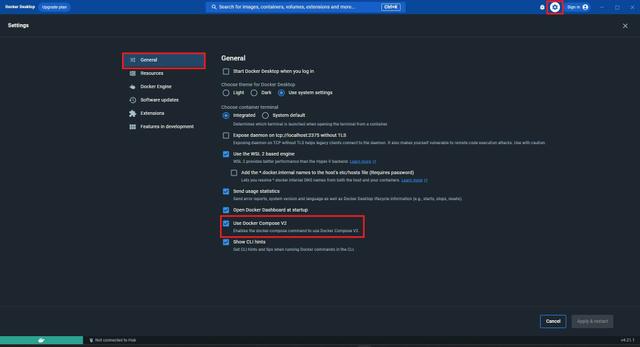
I ran into an error while trying to install a Sitecore Docker instance using the Sitecore Getting Started Template and if the error is related to "network nat is ambiguous". This happened recently. I couldn't find a straightforward answer online to fix the problem, so I decided to investigate it
Sitecore
As a Sitecore developer, encountering build errors can be quite frustrating. One common issue you might come across is the dreaded. NuGet.Protocol.Core.Types.FatalProtocolException: Unable to load the service index for source https://sitecore.myget.org/F/sc-packages/api/v3/index.json.Don't worry, though - you're not alone in facing this problem. Sitecore relies on Myget as its primary public package
Sitecore Docker
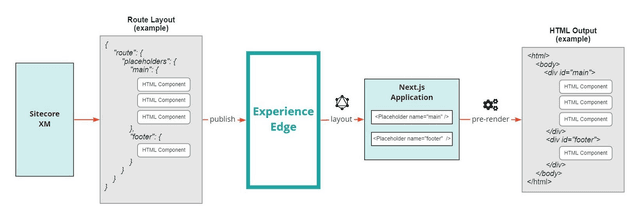
While attempting to install the Sitecore Docker Containers template for Next.js, I encountered the following error. Despite having installed all the necessary prerequisites for Sitecore Docker, the error persisted. Unfortunately, my internet search for a direct solution based on the error yielded no results. Consequently, I decided to address this
Sitecore Headless
When I first embarked on my journey with Headless technology, I wondered if it was feasible to transition an existing Sitecore MVC site to a more modern Headless solution, or if it was necessary to start development from scratch. This article will provide a step-by-step guide on how to convert
Sitecore Docker
Embarking on a journey with Docker and Sitecore can be an exciting venture, especially given the fascinating complexity and efficiency of Docker images. If you're intrigued by questions such as 'How are Docker images constructed?' or 'How can I integrate custom or hotfix packages into Sitecore?', then you're in the
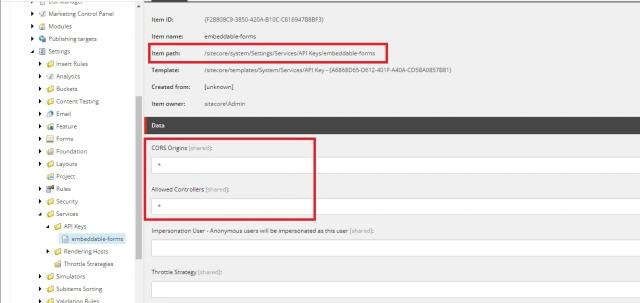
Sitecore Forms
In Sitecore 10.3, a new feature known as the Embeddable Forms Framework (EFF) was introduced, providing the ability to integrate Sitecore forms into any webpage, regardless of whether it is running on a Sitecore application or not. This additional flexibility gives developers the opportunity to utilize Sitecore's form functionalities across
Sitecore Docker
In our previous blog post, we successfully installed SXA and SPE on our Docker image. In this upcoming post, we will explore the process of creating a solution using Helix architecture and implementing changes on Docker. Creating Sitecore Docker Solution with Helix Architecture We can now begin the process of
Sitecore Docker
Are you looking to set up a Sitecore XM Cloud locally using Docker containers? In this comprehensive guide, I will walk you through the process of setting up a Sitecore XM Cloud environment using Docker containers. Sitecore XM Cloud is a powerful platform that enables you to create and manage
Sitecore Docker
Our previous post focused on how we updated the folder structure to comply with Helix principles, enabling us to construct our solution utilizing the Helix methodology. Additionally, we aimed to simplify the implementation process by utilizing the XM topology. In this blog, we will delve into the process of integrating
Sitecore Docker
In our previous post, we discussed the installation of Docker using the default template which utilizes the Sitecore XP0 topology. In this blog post, we will update the folder structure to align with Helix principles, which will assist us in building our solution using the Helix methodology. Furthermore, we will
Sitecore Docker
As I began to learn Sitecore Docker, I utilized the Sitecore Custom Images Docker for customization. However, I often found myself pondering on how to build a Sitecore Docker solution from scratch. Despite scouring various online resources for information on this topic, I found that the information provided was insufficient
Sitecore
If you're experiencing long wait times for indexing when publishing via the Sitecore Publishing Service, especially when publishing a large number of items (about 1000 to 1500), this could be caused by the Sitecore Web Index being frequently triggered. When this occurs, the entire index initiates, and content dependent on
Ordercloud
Sitecore OrderCloud Headstart is a game-changing e-commerce solution that streamlines the online sales process for businesses. In this series of guides, we’ll take you through the steps of getting started with a local installation of Sitecore OrderCloud Headstart. Clone the OrderCloud Headstart project from official site Prerequisites Node JS Angular
Ordercloud
In the following section, we will walk through the steps necessary to configure Azure Storage Explorer in preparation for subsequent procedures. Setting up the Azure Storage Explorer Launch Azure Storage Explorer on your system Find the “Open Connect” option on the left pane and click on it A pop-up window
Ordercloud
This blog will guide you through the process of creating a blob storage container and uploading the translation file needed by both the Buyer and Seller UI Applications. Right-click on the Blob Containers of the Local Storage account created in the previous part and select “Create Blob Container.” Name the
Ordercloud
In this guide (Part 4), you will learn how to set up and configure the Middleware Project locally. The steps and instructions provided will help you successfully complete the installation process and run middleware on your local machine. The Middleware Project acts as a connector between the Buyer/Seller and the
Ordercloud
In our previous blog, we set up and configured the Middleware Project locally. In this blog, we will cover seeding our OrderCloud data and installing the dependencies for the Buyer and Seller app. Seeding the OrderCloud data Prior to launching the Buyer and Seller application, it is essential to configure
Ordercloud
In this blog we’ll be focusing on setting up the necessary settings for running the Seller UI Application. Go to the src\UI\Seller\src\assets\appConfigs\defaultadmin-test.json file. Update the necessary values in the file. Running the Seller UI Application Open Visual Studio Code From the terminal navigate to src\ui\Seller Run the below command to
Ordercloud
Getting Started with Sitecore OrderCloud Headstart: A Local Installation Guide Series This blog post will guide you through the process of setting up and running the Buyer UI Application. The steps are similar to running the Seller UI application, with just a few changes. Go to the src\UI\Buyer\src\environments\environment.local.ts file. Update
Ordercloud
As a business, the ability to manage and fulfill orders efficiently is crucial to success. With the growing demands of online commerce, the need for an efficient and reliable order management system has never been greater. Sitecore Order Cloud is a comprehensive solution designed to meet the needs of businesses